
Appearance
Cesium
Cesium三维渲染引擎 - 第三方导出
参阅
函数
| 函数 | 描述 |
|---|---|
| Stereographic | Represents a point in stereographic coordinates, which can be obtained by projecting a cartesian coordinate from one pole onto a tangent plane at the other pole. The stereographic projection faithfully represents the relative directions of all great circles passing through its center point. To faithfully represents angles everywhere, this is a conformal projection, which means points are projected onto an arbrary sphere. |
| createAABBForNode | Creates an axis-aligned bounding box for a quadtree node at the given tree-space coordinates and level. This AABB is in the tree's local space (where the root node of the tree is a unit cube in its own local space). |
| barycentricCoordinates | Computes the barycentric coordinates for a point with respect to a triangle. |
| binarySearch | Finds an item in a sorted array. |
| buildModuleUrl | Given a relative URL under the Cesium base URL, returns an absolute URL. |
| clone | Clones an object, returning a new object containing the same properties. |
| combine | Merges two objects, copying their properties onto a new combined object. When two objects have the same property, the value of the property on the first object is used. If either object is undefined, it will be treated as an empty object. |
| createGuid | Creates a Globally unique identifier (GUID) string. A GUID is 128 bits long, and can guarantee uniqueness across space and time. |
| createWorldBathymetryAsync | Creates a CesiumTerrainProvider instance for the Cesium World Bathymetry. |
| createWorldTerrainAsync | Creates a CesiumTerrainProvider instance for the Cesium World Terrain. |
| defined | - |
| destroyObject | Destroys an object. Each of the object's functions, including functions in its prototype, is replaced with a function that throws a DeveloperError, except for the object's isDestroyed function, which is set to a function that returns true. The object's properties are removed with delete. This function is used by objects that hold native resources, e.g., WebGL resources, which need to be explicitly released. Client code calls an object's destroy function, which then releases the native resource and calls destroyObject to put itself in a destroyed state. |
| formatError | Formats an error object into a String. If available, uses name, message, and stack properties, otherwise, falls back on toString(). |
| getAbsoluteUri | Given a relative Uri and a base Uri, returns the absolute Uri of the relative Uri. |
| getBaseUri | Given a URI, returns the base path of the URI. |
| getExtensionFromUri | Given a URI, returns the extension of the URI. |
| getFilenameFromUri | Given a URI, returns the last segment of the URI, removing any path or query information. |
| getImagePixels | Extract a pixel array from a loaded image. Draws the image into a canvas so it can read the pixels back. |
| getTimestamp | Gets a timestamp that can be used in measuring the time between events. Timestamps are expressed in milliseconds, but it is not specified what the milliseconds are measured from. This function uses performance.now() if it is available, or Date.now() otherwise. |
| isLeapYear | Determines if a given date is a leap year. |
| mergeSort | A stable merge sort. |
| objectToQuery | Converts an object representing a set of name/value pairs into a query string, with names and values encoded properly for use in a URL. Values that are arrays will produce multiple values with the same name. |
| pointInsideTriangle | Determines if a point is inside a triangle. |
| queryToObject | Parses a query string into an object, where the keys and values of the object are the name/value pairs from the query string, decoded. If a name appears multiple times, the value in the object will be an array of values. |
| sampleTerrain | Initiates a terrain height query for an array of Cartographic positions by requesting tiles from a terrain provider, sampling, and interpolating. The interpolation matches the triangles used to render the terrain at the specified level. The query happens asynchronously, so this function returns a promise that is resolved when the query completes. Each point height is modified in place. If a height can not be determined because no terrain data is available for the specified level at that location, or another error occurs, the height is set to undefined. As is typical of the Cartographic type, the supplied height is a height above the reference ellipsoid (such as Ellipsoid.WGS84) rather than an altitude above mean sea level. In other words, it will not necessarily be 0.0 if sampled in the ocean. This function needs the terrain level of detail as input, if you need to get the altitude of the terrain as precisely as possible (i.e. with maximum level of detail) use sampleTerrainMostDetailed. |
| sampleTerrainMostDetailed | Initiates a sampleTerrain() request at the maximum available tile level for a terrain dataset. |
| srgbToLinear | Converts the value from sRGB color space to linear color space. |
| subdivideArray | Subdivides an array into a number of smaller, equal sized arrays. |
| measureText | Computes dimensions for text, based on current canvas state. |
| writeTextToCanvas | Writes the given text into a new canvas. The canvas will be sized to fit the text. If text is blank, returns undefined. |
| exportKml | Exports an EntityCollection as a KML document. Only Point, Billboard, Model, Path, Polygon, Polyline geometries will be exported. Note that there is not a 1 to 1 mapping of Entity properties to KML Feature properties. For example, entity properties that are time dynamic but cannot be dynamic in KML are exported with their values at options.time or the beginning of the EntityCollection's time interval if not specified. For time-dynamic properties that are supported in KML, we use the samples if it is a SampledProperty otherwise we sample the value using the options.sampleDuration. Point, Billboard, Model and Path geometries with time-dynamic positions will be exported as gx:Track Features. Not all Materials are representable in KML, so for more advanced Materials just the primary color is used. Canvas objects are exported as PNG images. |
| PickId | - |
| copyArrayCartesian3 | Returns a deep copy of the given array. |
| equalsArrayCartesian3 | Returns whether the given arrays are component-wise equal. |
| unapplyValueTransform | Returns a shader statement that applies the inverse of the value transform to the given value, based on the given offset and scale. |
| unnormalize | Returns a shader statement that applies the inverse of the normalization, based on the given component type |
| getSourceValueStringScalar | Creates a shader statement that returns the value of the specified property, normalized to the range [0, 1]. |
| getSourceValueStringComponent | Creates a shader statement that returns the value of the specified component of the given property, normalized to the range [0, 1]. |
| loadGltfJson | Loads the gltf object |
| removeExtension | Removes an extension from gltf.extensions, gltf.extensionsUsed, gltf.extensionsRequired, and any other objects in the glTF if it is present. |
| loadCubeMapImagesForUniform | Loads the images for a cubemap uniform, if it has changed since the last time this was called. |
| createCovarianceMatrixFromUpperTriangle | Creates a Matrix3 that describes a covariance matrix (which is symmetric) from the array containing the upper triangle, in column-major order. |
| createAnchorPointDirect | Creates an AnchorPointDirect from the given JSON representation |
| createAnchorPointIndirect | Creates an AnchorPointIndirect from the given JSON representation |
| createCorrelationGroup | Creates a CorrelationGroup from the given JSON representation |
| computePickingDrawingBufferRectangle | Compute the rectangle that describes the part of the drawing buffer that is relevant for picking. |
| pickBegin | Setup needed before picking. |
| pickEnd | Teardown needed after picking. |
| addDrillPickedResults | - |
| drillPick | Drill pick by repeatedly calling a given pickCallback, each time stripping away the previously picked objects. |
| removeInvalidBinaryBodyReferences | Remove all invalid binary body references from the batch table JSON of the given parsed content. |
| obtainTranslucentCommandExecutionFunction | Determine how translucent surfaces will be handled. |
| createElevationBandMaterial | Creates a Material that combines multiple layers of color/gradient bands and maps them to terrain heights. |
| createGooglePhotorealistic3DTileset | Creates a Cesium3DTileset instance for the Google Photorealistic 3D Tiles tileset. |
| createOsmBuildingsAsync | Creates a Cesium3DTileset instance for the Cesium OSM Buildings tileset. |
| createTangentSpaceDebugPrimitive | Creates a Primitive to visualize well-known vector vertex attributes: normal, tangent, and bitangent. Normal is red; tangent is green; and bitangent is blue. If an attribute is not present, it is not drawn. |
| createWorldImageryAsync | Creates an IonImageryProvider instance for ion's default global base imagery layer, currently Bing Maps. |
| viewerCesium3DTilesInspectorMixin | A mixin which adds the Cesium3DTilesInspector widget to the Viewer widget. Rather than being called directly, this function is normally passed as a parameter to Viewer#extend, as shown in the example below. |
| viewerCesiumInspectorMixin | A mixin which adds the CesiumInspector widget to the Viewer widget. Rather than being called directly, this function is normally passed as a parameter to Viewer#extend, as shown in the example below. |
| viewerDragDropMixin | A mixin which adds default drag and drop support for CZML files to the Viewer widget. Rather than being called directly, this function is normally passed as a parameter to Viewer#extend, as shown in the example below. |
| viewerPerformanceWatchdogMixin | A mixin which adds the PerformanceWatchdog widget to the Viewer widget. Rather than being called directly, this function is normally passed as a parameter to Viewer#extend, as shown in the example below. |
| viewerVoxelInspectorMixin | A mixin which adds the VoxelInspector widget to the Viewer widget. Rather than being called directly, this function is normally passed as a parameter to Viewer#extend, as shown in the example below. |
| createCommand | Create a Command from a given function, for use with ViewModels. |
变量
| 变量 | 描述 |
|---|---|
| Check | Contains functions for checking that supplied arguments are of a specified type or meet specified conditions |
| needsRebuild | Indicates whether the terrain picker needs to be rebuilt due to changes in the underlying terrain mesh's vertices or indices. |
| DONE | The BoundingSphere has been computed. |
| PENDING | The BoundingSphere is still being computed. |
| FAILED | The BoundingSphere does not exist. |
| geometryUpdaters | - |
| SVG_MAX_SIZE_PX | Arbitrary limit on allocated SVG size, in pixels. Raster images use image resolution. |
| of | The CesiumWidget#scene that the tileset will be rendered in, required for tilesets that specify a heightReference value for clamping 3D Tiles vector data content- like points, lines, and labels- to terrain or 3D tiles. |
| minificationFilter | The TextureMinificationFilter to apply to this material's textures. |
| magnificationFilter | The TextureMagnificationFilter to apply to this material's textures. |
| nearestSampling | Gets or sets the nearest sampling flag. |
| schemaId | The optional ID of the metadata schema |
| className | The name of the metadata class |
| propertyName | The name of the metadata property |
| classProperty | The the MetadataClassProperty that is described by this structure, as obtained from the MetadataSchema |
| metadataProperty | The PropertyTextureProperty or PropertyAttributeProperty that is described by this structure, as obtained from the property texture or property attribute of the StructuralMetadata that matches the class name and property name. |
| TILE_SIZE | Creates a spatial hash key for the given longitude, latitude, and tile level. The precision is adjusted based on the tile level and extent to achieve finer precision at higher levels. |
| metadata | The metadata for this voxel content. The metadata is an array of typed arrays, one for each field. The data for one field is a flattened 3D array ordered by X, then Y, then Z. |
| availableLevels | The number of levels of detail containing available tiles in the tileset. |
| includesReverseAxis | EPSG codes known to include reverse axis orders, but are not within 4000-5000. |
| excludesReverseAxis | EPSG codes known to not include reverse axis orders, and are within 4000-5000. |
命名空间
| 命名空间 | 描述 |
|---|---|
| ArcGISTiledElevationTerrainProvider | - |
| Cesium3DTilesTerrainProvider | - |
| CesiumTerrainProvider | - |
| CubicRealPolynomial | Defines functions for 3rd order polynomial functions of one variable with only real coefficients. |
| CustomHeightmapTerrainProvider | - |
| EasingFunction | Easing functions for use with TweenCollection. These function are from Tween.js and Robert Penner. See the Tween.js graphs for each function. |
| Event | - |
| EventHelper | - |
| FeatureDetection | A set of functions to detect whether the current browser supports various features. |
| Frozen | Utilities helpful for setting a default value for a parameter. |
| Fullscreen | Browser-independent functions for working with the standard fullscreen API. |
| GeocoderService | - |
| GeometryPipeline | Content pipeline functions for geometries. |
| GoogleEarthEnterpriseTerrainProvider | - |
| GoogleMaps | Default settings for accessing the Google Maps API. An API key is only required if you are directly using any Google Maps APIs, such as through createGooglePhotorealistic3DTileset. Follow instructions for managing API keys for the Google Maps Platform at https://developers.google.com/maps/documentation/embed/get-api-key. You can enable multiple Google Maps Platform APIs on a single API key. However, a separate GoogleMaps.defaultStreetViewStaticApiKey is available if you prefer to use a dedicated key for the Street View Static API. |
| HermitePolynomialApproximation | An InterpolationAlgorithm for performing Hermite interpolation. |
| HilbertOrder | Hilbert Order helper functions. |
| ITwinPlatform | Default settings for accessing the iTwin platform. |
| InterpolationAlgorithm | - |
| IntersectionTests | Functions for computing the intersection between geometries such as rays, planes, triangles, and ellipsoids. |
| Intersections2D | Contains functions for operating on 2D triangles. |
| Ion | Default settings for accessing the Cesium ion API. |
| Iso8601 | Constants related to ISO8601 support. |
| LagrangePolynomialApproximation | An InterpolationAlgorithm for performing Lagrange interpolation. |
| LinearApproximation | An InterpolationAlgorithm for performing linear interpolation. |
| Math | Math functions. |
| Packable | - |
| PackableForInterpolation | Static interface for Packable types which are interpolated in a different representation than their packed value. These methods and properties are expected to be defined on a constructor function. |
| QuadraticRealPolynomial | Defines functions for 2nd order polynomial functions of one variable with only real coefficients. |
| QuarticRealPolynomial | Defines functions for 4th order polynomial functions of one variable with only real coefficients. |
| Queue | - |
| Request | - |
| RequestScheduler | The request scheduler is used to track and constrain the number of active requests in order to prioritize incoming requests. The ability to retain control over the number of requests in CesiumJS is important because due to events such as changes in the camera position, a lot of new requests may be generated and a lot of in-flight requests may become redundant. The request scheduler manually constrains the number of requests so that newer requests wait in a shorter queue and don't have to compete for bandwidth with requests that have expired. |
| Resource | - |
| ScreenSpaceEventHandler | - |
| Simon1994PlanetaryPositions | Contains functions for finding the Cartesian coordinates of the sun and the moon in the Earth-centered inertial frame. |
| TerrainProvider | - |
| TileProviderError | - |
| TimeInterval | - |
| Transforms | Contains functions for transforming positions to various reference frames. |
| TridiagonalSystemSolver | Uses the Tridiagonal Matrix Algorithm, also known as the Thomas Algorithm, to solve a system of linear equations where the coefficient matrix is a tridiagonal matrix. |
| TrustedServers | A singleton that contains all of the servers that are trusted. Credentials will be sent with any requests to these servers. |
| VRTheWorldTerrainProvider | - |
| BillboardGraphics | - |
| BoxGraphics | - |
| CallbackPositionProperty | - |
| CallbackProperty | - |
| Cesium3DTilesetGraphics | - |
| CorridorGraphics | - |
| CylinderGraphics | - |
| CzmlDataSource | - |
| DataSourceDisplay | - |
| EllipseGraphics | - |
| EllipsoidGraphics | - |
| Entity | - |
| EntityCluster | - |
| EntityCollection | - |
| GeoJsonDataSource | - |
| KmlDataSource | - |
| KmlFeatureData | - |
| KmlTourFlyTo | - |
| KmlTourWait | - |
| LabelGraphics | - |
| ModelGraphics | - |
| PathGraphics | - |
| PlaneGraphics | - |
| PointGraphics | - |
| PolygonGraphics | - |
| PolylineGraphics | - |
| PolylineVolumeGraphics | - |
| RectangleGraphics | - |
| Rotation | - |
| WallGraphics | - |
| ArcGisMapServerImageryProvider | - |
| ArcGisMapService | Default options for accessing the ArcGIS image tile service. |
| Azure2DImageryProvider | - |
| Billboard | - |
| BingMapsImageryProvider | - |
| BlendingState | The blending state combines BlendEquation and BlendFunction and the enabled flag to define the full blending state for combining source and destination fragments when rendering. This is a helper when using custom render states with Appearance#renderState. |
| Camera | - |
| Cesium3DTilesVoxelProvider | - |
| Cesium3DTileset | - |
| CubeMapPanorama | - |
| DynamicEnvironmentMapManager | - |
| EquirectangularPanorama | - |
| Google2DImageryProvider | - |
| GoogleEarthEnterpriseImageryProvider | - |
| GoogleEarthEnterpriseMapsProvider | - |
| GridImageryProvider | - |
| I3SDataProvider | - |
| I3SNode | - |
| ITwinData | Methods for loading iTwin platform data into CesiumJS |
| ImageryLayer | - |
| IonImageryProvider | - |
| Label | - |
| MapboxImageryProvider | - |
| MapboxStyleImageryProvider | - |
| MaterialAppearance | - |
| AnchorPointDirect | - |
| AnchorPointIndirect | - |
| CorrelationGroup | - |
| GltfGpmLocal | - |
| Spdcf | - |
| Model | - |
| ModelAnimation | - |
| OpenStreetMapImageryProvider | - |
| ParticleSystem | - |
| PostProcessStageLibrary | Contains functions for creating common post-process stages. |
| SceneTransforms | Functions that do scene-dependent transforms between rendering-related coordinate systems. |
| SingleTileImageryProvider | - |
| Terrain | - |
| TileCoordinatesImageryProvider | - |
| TileMapServiceImageryProvider | - |
| UrlTemplateImageryProvider | - |
| WebMapServiceImageryProvider | - |
| WebMapTileServiceImageryProvider | - |
| AnimationViewModel | - |
| ProviderViewModel | - |
| Geocoder | - |
| SelectionIndicatorViewModel | - |
| SvgPathBindingHandler | A Knockout binding handler that creates a DOM element for a single SVG path. This binding handler will be registered as cesiumSvgPath. |
| Viewer | - |
接口
| 接口 | 描述 |
|---|---|
| InterpolationAlgorithm | The interface for interpolation algorithms. |
| Packable | Static interface for types which can store their values as packed elements in an array. These methods and properties are expected to be defined on a constructor function. |
| Rotation | Represents a Packable number that always interpolates values towards the shortest angle of rotation. This object is never used directly but is instead passed to the constructor of SampledProperty in order to represent a two-dimensional angle of rotation. |
| exportKmlResultKml | - |
| exportKmlResultKmz | - |
| ContextOptions | Options to control the setting up of a WebGL Context.
|
| WebGLOptions | WebGL options to be passed on to HTMLCanvasElement.getContext(). See WebGLContextAttributes but note the modified defaults for 'alpha', 'stencil', and 'powerPreference' |
| DirectionUp | An orientation given by a pair of unit vectors |
| HeadingPitchRollValues | An orientation given by numeric heading, pitch, and roll |
| UniformSpecifier | An object describing a uniform, its type, and an initial value |
| PickedMetadataInfo | Information about metadata that is supposed to be picked |
| createElevationBandMaterialEntry | - |
| createElevationBandMaterialBand | - |
枚举
| 枚举 | 描述 |
|---|---|
| WebGLConstants | Enum containing WebGL Constant values by name. for use without an active WebGL context, or in cases where certain constants are unavailable using the WebGL context (For example, in [Safari 9]https://github.com/CesiumGS/cesium/issues/2989). |
| ArcType | ArcType defines the path that should be taken connecting vertices. |
| ClockRange | Constants used by Clock#tick to determine behavior when Clock#startTime or Clock#stopTime is reached. |
| ClockStep | Constants to determine how much time advances with each call to Clock#tick. |
| ComponentDatatype | WebGL component datatypes. Components are intrinsics, which form attributes, which form vertices. |
| CornerType | Style options for corners. |
| ExtrapolationType | Constants to determine how an interpolated value is extrapolated when querying outside the bounds of available data. |
| GeocodeType | The type of geocoding to be performed by a GeocoderService. |
| HeightmapEncoding | The encoding that is used for a heightmap |
| IndexDatatype | Constants for WebGL index datatypes. These corresponds to the type parameter of drawElements. |
| Intersect | This enumerated type is used in determining where, relative to the frustum, an object is located. The object can either be fully contained within the frustum (INSIDE), partially inside the frustum and partially outside (INTERSECTING), or somewhere entirely outside of the frustum's 6 planes (OUTSIDE). |
| IonGeocodeProviderType | Underlying geocoding services that can be used via Cesium ion. |
| KeyboardEventModifier | This enumerated type is for representing keyboard modifiers. These are keys that are held down in addition to other event types. |
| PixelFormat | The format of a pixel, i.e., the number of components it has and what they represent. |
| PrimitiveType | The type of a geometric primitive, i.e., points, lines, and triangles. |
| ReferenceFrame | Constants for identifying well-known reference frames. |
| RequestState | State of the request. |
| RequestType | An enum identifying the type of request. Used for finer grained logging and priority sorting. |
| ScreenSpaceEventType | This enumerated type is for classifying mouse events: down, up, click, double click, move and move while a button is held down. |
| TimeStandard | Provides the type of time standards which JulianDate can take as input. |
| TrackingReferenceFrame | Constants for identifying well-known tracking reference frames. |
| Visibility | This enumerated type is used in determining to what extent an object, the occludee, is visible during horizon culling. An occluder may fully block an occludee, in which case it has no visibility, may partially block an occludee from view, or may not block it at all, leading to full visibility. |
| WindingOrder | Winding order defines the order of vertices for a triangle to be considered front-facing. |
| StripeOrientation | Defined the orientation of stripes in StripeMaterialProperty. |
| PixelDatatype | The data type of a pixel. |
| TextureMagnificationFilter | Enumerates all possible filters used when magnifying WebGL textures. |
| TextureMinificationFilter | Enumerates all possible filters used when minifying WebGL textures. |
| ArcGisBaseMapType | ArcGisBaseMapType enumerates the ArcGIS image tile layers that are supported by default. |
| Axis | An enum describing the x, y, and z axes and helper conversion functions. |
| BingMapsStyle | The types of imagery provided by Bing Maps. |
| BlendEquation | Determines how two pixels' values are combined. |
| BlendFunction | Determines how blending factors are computed. |
| BlendOption | Determines how opaque and translucent parts of billboards, points, and labels are blended with the scene. |
| CameraEventType | Enumerates the available input for interacting with the camera. |
| Cesium3DTileColorBlendMode | Defines how per-feature colors set from the Cesium API or declarative styling blend with the source colors from the original feature, e.g. glTF material or per-point color in the tile. When A feature whose color evaluates to white (1.0, 1.0, 1.0) is always rendered without color blending, regardless of the tileset's color blend mode. |
| ClassificationType | Whether a classification affects terrain, 3D Tiles or both. |
| CloudType | Specifies the type of the cloud that is added to a CloudCollection in CloudCollection#add. |
| ColorBlendMode | Defines different modes for blending between a target color and a primitive's source color. |
| CullFace | Determines which triangles, if any, are culled. |
| DepthFunction | Determines the function used to compare two depths for the depth test. |
| DynamicAtmosphereLightingType | Atmosphere lighting effects (sky atmosphere, ground atmosphere, fog) can be further modified with dynamic lighting from the sun or other light source that changes over time. This enum determines which light source to use. |
| HeightReference | Represents the position relative to the terrain. |
| HorizontalOrigin | The horizontal location of an origin relative to an object, e.g., a Billboard or Label. For example, setting the horizontal origin to LEFT or RIGHT will display a billboard to the left or right (in screen space) of the anchor position. 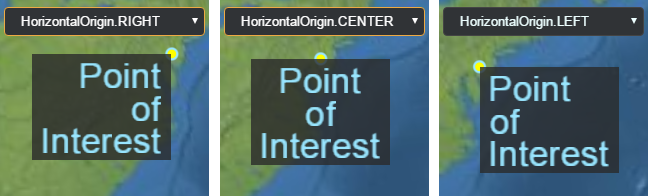 |
| IonWorldImageryStyle | The types of imagery provided by createWorldImagery. |
| LabelStyle | Describes how to draw a label. |
| MapMode2D | Describes how the map will operate in 2D. |
| MetadataComponentType | An enum of metadata component types. |
| MetadataType | An enum of metadata types. These metadata types are containers containing one or more components of type MetadataComponentType |
| CustomShaderMode | An enum describing how the CustomShader will be added to the fragment shader. This determines how the shader interacts with the material. |
| CustomShaderTranslucencyMode | An enum for controling how CustomShader handles translucency compared with the original primitive. |
| StorageType | An enum of storage types for covariance information. |
| LightingModel | The lighting model to use for lighting a Model. |
| UniformType | An enum of the basic GLSL uniform types. These can be used with CustomShader to declare user-defined uniforms. |
| VaryingType | An enum for the GLSL varying types. These can be used for declaring varyings in CustomShader |
| ModelAnimationLoop | Determines if and how a glTF animation is looped. |
| PostProcessStageSampleMode | Determines how input texture to a PostProcessStage is sampled. |
| SceneMode | Indicates if the scene is viewed in 3D, 2D, or 2.5D Columbus view. |
| SensorVolumePortionToDisplay | Constants used to indicated what part of the sensor volume to display. |
| ShadowMode | Specifies whether the object casts or receives shadows from light sources when shadows are enabled. |
| SplitDirection | The direction to display a primitive or ImageryLayer relative to the Scene#splitPosition. |
| StencilFunction | Determines the function used to compare stencil values for the stencil test. |
| StencilOperation | Determines the action taken based on the result of the stencil test. |
| Tonemapper | A tonemapping algorithm when rendering with high dynamic range. |
| VerticalOrigin | The vertical location of an origin relative to an object, e.g., a Billboard or Label. For example, setting the vertical origin to TOP or BOTTOM will display a billboard above or below (in screen space) the anchor position. 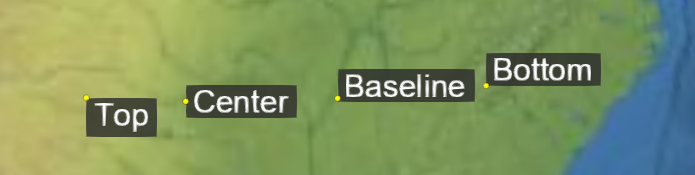 |
| VoxelShapeType | An enum of voxel shapes. The shape controls how the voxel grid is mapped to 3D space. |
类
| 类 | 描述 |
|---|---|
| ArcGISTiledElevationTerrainProvider | To construct a CesiumTerrainProvider, call ArcGISTiledElevationTerrainProvider.fromUrl. Do not call the constructor directly. |
| AssociativeArray | A collection of key-value pairs that is stored as a hash for easy lookup but also provides an array for fast iteration. |
| AxisAlignedBoundingBox | Creates an instance of an AxisAlignedBoundingBox from the minimum and maximum points along the x, y, and z axes. |
| BingMapsGeocoderService | Provides geocoding through Bing Maps. |
| BoundingRectangle | A bounding rectangle given by a corner, width and height. |
| BoundingSphere | A bounding sphere with a center and a radius. |
| BoxGeometry | Describes a cube centered at the origin. |
| BoxOutlineGeometry | A description of the outline of a cube centered at the origin. |
| Cartesian2 | A 2D Cartesian point. |
| Cartesian3 | A 3D Cartesian point. |
| Cartesian4 | A 4D Cartesian point. |
| Cartographic | A position defined by longitude, latitude, and height. |
| CartographicGeocoderService | Geocodes queries containing longitude and latitude coordinates and an optional height. Query format: longitude latitude (height) with longitude/latitude in degrees and height in meters. |
| CatmullRomSpline | A Catmull-Rom spline is a cubic spline where the tangent at control points, except the first and last, are computed using the previous and next control points. Catmull-Rom splines are in the class C1. |
| Cesium3DTilesTerrainData | Terrain data for a single tile where the terrain data is represented as a glb (binary glTF). |
| Cesium3DTilesTerrainProvider | To construct a Cesium3DTilesTerrainProvider, call Cesium3DTilesTerrainProvider.fromIonAssetId or Cesium3DTilesTerrainProvider.fromUrl. Do not call the constructor directly. |
| CesiumTerrainProvider | To construct a CesiumTerrainProvider, call CesiumTerrainProvider.fromIonAssetId or CesiumTerrainProvider.fromUrl. Do not call the constructor directly. |
| CircleGeometry | A description of a circle on the ellipsoid. Circle geometry can be rendered with both Primitive and GroundPrimitive. |
| CircleOutlineGeometry | A description of the outline of a circle on the ellipsoid. |
| Clock | A simple clock for keeping track of simulated time. |
| Color | A color, specified using red, green, blue, and alpha values, which range from 0 (no intensity) to 1.0 (full intensity). |
| ColorGeometryInstanceAttribute | Value and type information for per-instance geometry color. |
| CompressedTextureBuffer | Describes a compressed texture and contains a compressed texture buffer. |
| ConstantSpline | A spline that evaluates to a constant value. Although this follows the Spline interface, it does not maintain an internal array of times since its value never changes. |
| CoplanarPolygonGeometry | A description of a polygon composed of arbitrary coplanar positions. |
| CoplanarPolygonOutlineGeometry | A description of the outline of a polygon composed of arbitrary coplanar positions. |
| CorridorGeometry | A description of a corridor. Corridor geometry can be rendered with both Primitive and GroundPrimitive. |
| CorridorOutlineGeometry | A description of a corridor outline. |
| Credit | A credit contains data pertaining to how to display attributions/credits for certain content on the screen. |
| CullingVolume | The culling volume defined by planes. |
| CustomHeightmapTerrainProvider | A simple TerrainProvider that gets height values from a callback function. It can be used for procedurally generated terrain or as a way to load custom heightmap data without creating a subclass of TerrainProvider. |
| CylinderGeometry | A description of a cylinder. |
| CylinderOutlineGeometry | A description of the outline of a cylinder. |
| DefaultProxy | A simple proxy that appends the desired resource as the sole query parameter to the given proxy URL. |
| DeveloperError | Constructs an exception object that is thrown due to a developer error, e.g., invalid argument, argument out of range, etc. This exception should only be thrown during development; it usually indicates a bug in the calling code. This exception should never be caught; instead the calling code should strive not to generate it. On the other hand, a RuntimeError indicates an exception that may be thrown at runtime, e.g., out of memory, that the calling code should be prepared to catch. |
| DistanceDisplayCondition | Determines visibility based on the distance to the camera. |
| DistanceDisplayConditionGeometryInstanceAttribute | Value and type information for per-instance geometry attribute that determines if the geometry instance has a distance display condition. |
| EllipseGeometry | A description of an ellipse on an ellipsoid. Ellipse geometry can be rendered with both Primitive and GroundPrimitive. |
| EllipseOutlineGeometry | A description of the outline of an ellipse on an ellipsoid. |
| Ellipsoid | A quadratic surface defined in Cartesian coordinates by the equation (x / a)^2 + (y / b)^2 + (z / c)^2 = 1. Primarily used by Cesium to represent the shape of planetary bodies. |
| EllipsoidGeodesic | Initializes a geodesic on the ellipsoid connecting the two provided planetodetic points. |
| EllipsoidGeometry | A description of an ellipsoid centered at the origin. |
| EllipsoidOutlineGeometry | A description of the outline of an ellipsoid centered at the origin. |
| EllipsoidRhumbLine | Initializes a rhumb line on the ellipsoid connecting the two provided planetodetic points. |
| EllipsoidTangentPlane | A plane tangent to the provided ellipsoid at the provided origin. If origin is not on the surface of the ellipsoid, it's surface projection will be used. If origin is at the center of the ellipsoid, an exception will be thrown. |
| EllipsoidTerrainProvider | A very simple TerrainProvider that produces geometry by tessellating an ellipsoidal surface. |
| Event | A generic utility class for managing subscribers for a particular event. This class is usually instantiated inside of a container class and exposed as a property for others to subscribe to. |
| EventHelper | A convenience object that simplifies the common pattern of attaching event listeners to several events, then removing all those listeners at once later, for example, in a destroy method. |
| FrustumGeometry | Describes a frustum at the given the origin and orientation. |
| FrustumOutlineGeometry | A description of the outline of a frustum with the given the origin and orientation. |
| GeocoderService | Provides geocoding through an external service. This type describes an interface and is not intended to be used. |
| GeographicProjection | A simple map projection where longitude and latitude are linearly mapped to X and Y by multiplying them by the Ellipsoid#maximumRadius. This projection is commonly known as geographic, equirectangular, equidistant cylindrical, or plate carrée. When using the WGS84 ellipsoid, it is also known as EPSG:4326. |
| GeographicTilingScheme | A tiling scheme for geometry referenced to a simple GeographicProjection where longitude and latitude are directly mapped to X and Y. This projection is commonly known as geographic, equirectangular, equidistant cylindrical, or plate carrée. |
| Geometry | A geometry representation with attributes forming vertices and optional index data defining primitives. Geometries and an Appearance, which describes the shading, can be assigned to a Primitive for visualization. A Primitive can be created from many heterogeneous - in many cases - geometries for performance. Geometries can be transformed and optimized using functions in GeometryPipeline. |
| GeometryAttribute | Values and type information for geometry attributes. A Geometry generally contains one or more attributes. All attributes together form the geometry's vertices. |
| GeometryAttributes | Attributes, which make up a geometry's vertices. Each property in this object corresponds to a GeometryAttribute containing the attribute's data. Attributes are always stored non-interleaved in a Geometry. |
| GeometryFactory | Base class for all geometry creation utility classes that can be passed to GeometryInstance for asynchronous geometry creation. |
| GeometryInstance | Geometry instancing allows one Geometry object to be positions in several different locations and colored uniquely. For example, one BoxGeometry can be instanced several times, each with a different modelMatrix to change its position, rotation, and scale. |
| GeometryInstanceAttribute | Values and type information for per-instance geometry attributes. |
| GoogleEarthEnterpriseMetadata | To construct GoogleEarthEnterpriseMetadata, call GoogleEarthEnterpriseMetadata.fromUrl. Do not call the constructor directly. |
| GoogleEarthEnterpriseTerrainData | Terrain data for a single tile from a Google Earth Enterprise server. |
| GoogleEarthEnterpriseTerrainProvider | To construct a GoogleEarthEnterpriseTerrainProvider, call GoogleEarthEnterpriseTerrainProvider.fromMetadata. Do not call the constructor directly. |
| GoogleGeocoderService | Provides geocoding through Google. |
| GregorianDate | Represents a Gregorian date in a more precise format than the JavaScript Date object. In addition to submillisecond precision, this object can also represent leap seconds. |
| GroundPolylineGeometry | A description of a polyline on terrain or 3D Tiles. Only to be used with GroundPolylinePrimitive. |
| HeadingPitchRange | Defines a heading angle, pitch angle, and range in a local frame. Heading is the rotation from the local east direction where a positive angle is increasing southward. Pitch is the rotation from the local xy-plane. Positive pitch angles are above the plane. Negative pitch angles are below the plane. Range is the distance from the center of the frame. |
| HeadingPitchRoll | A rotation expressed as a heading, pitch, and roll. Heading is the rotation about the negative z axis. Pitch is the rotation about the negative y axis. Roll is the rotation about the positive x axis. |
| HeightmapTerrainData | Terrain data for a single tile where the terrain data is represented as a heightmap. A heightmap is a rectangular array of heights in row-major order from north to south and west to east. |
| HermiteSpline | A Hermite spline is a cubic interpolating spline. Points, incoming tangents, outgoing tangents, and times must be defined for each control point. The outgoing tangents are defined for points [0, n - 2] and the incoming tangents are defined for points [1, n - 1]. For example, when interpolating a segment of the curve between points[i] and points[i + 1], the tangents at the points will be outTangents[i] and inTangents[i], respectively. |
| Interval | Represents the closed interval [start, stop]. |
| IonGeocoderService | Provides geocoding through Cesium ion. |
| IonResource | A Resource instance that encapsulates Cesium ion asset access. This object is normally not instantiated directly, use IonResource.fromAssetId. |
| JulianDate | Represents an astronomical Julian date, which is the number of days since noon on January 1, -4712 (4713 BC). For increased precision, this class stores the whole number part of the date and the seconds part of the date in separate components. In order to be safe for arithmetic and represent leap seconds, the date is always stored in the International Atomic Time standard TimeStandard.TAI. |
| LeapSecond | Describes a single leap second, which is constructed from a JulianDate and a numerical offset representing the number of seconds TAI is ahead of the UTC time standard. |
| LinearSpline | A spline that uses piecewise linear interpolation to create a curve. |
| MapProjection | Defines how geodetic ellipsoid coordinates (Cartographic) project to a flat map like Cesium's 2D and Columbus View modes. |
| Matrix2 | A 2x2 matrix, indexable as a column-major order array. Constructor parameters are in row-major order for code readability. |
| Matrix3 | A 3x3 matrix, indexable as a column-major order array. Constructor parameters are in row-major order for code readability. |
| Matrix4 | A 4x4 matrix, indexable as a column-major order array. Constructor parameters are in row-major order for code readability. |
| MorphWeightSpline | A spline that linearly interpolates over an array of weight values used by morph targets. |
| NearFarScalar | Represents a scalar value's lower and upper bound at a near distance and far distance in eye space. |
| Occluder | Creates an Occluder derived from an object's position and radius, as well as the camera position. The occluder can be used to determine whether or not other objects are visible or hidden behind the visible horizon defined by the occluder and camera position. |
| OpenCageGeocoderService | Provides geocoding via a OpenCage server. |
| OrientedBoundingBox | Creates an instance of an OrientedBoundingBox. An OrientedBoundingBox of some object is a closed and convex rectangular cuboid. It can provide a tighter bounding volume than BoundingSphere or AxisAlignedBoundingBox in many cases. |
| OrthographicFrustum | The viewing frustum is defined by 6 planes. Each plane is represented by a Cartesian4 object, where the x, y, and z components define the unit vector normal to the plane, and the w component is the distance of the plane from the origin/camera position. |
| OrthographicOffCenterFrustum | The viewing frustum is defined by 6 planes. Each plane is represented by a Cartesian4 object, where the x, y, and z components define the unit vector normal to the plane, and the w component is the distance of the plane from the origin/camera position. |
| PeliasGeocoderService | Provides geocoding via a Pelias server. |
| PerspectiveFrustum | The viewing frustum is defined by 6 planes. Each plane is represented by a Cartesian4 object, where the x, y, and z components define the unit vector normal to the plane, and the w component is the distance of the plane from the origin/camera position. |
| PerspectiveOffCenterFrustum | The viewing frustum is defined by 6 planes. Each plane is represented by a Cartesian4 object, where the x, y, and z components define the unit vector normal to the plane, and the w component is the distance of the plane from the origin/camera position. |
| PinBuilder | A utility class for generating custom map pins as canvas elements. 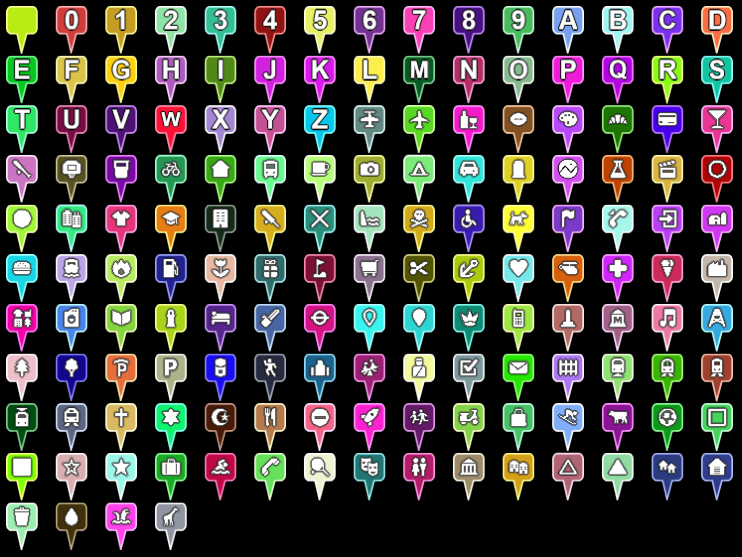 Example pins generated using both the maki icon set, which ships with Cesium, and single character text. |
| Plane | A plane in Hessian Normal Form defined by ax + by + cz + d = 0where (a, b, c) is the plane's normal, d is the signed distance to the plane, and (x, y, z) is any point on the plane. |
| PlaneGeometry | Describes geometry representing a plane centered at the origin, with a unit width and length. |
| PlaneOutlineGeometry | Describes geometry representing the outline of a plane centered at the origin, with a unit width and length. |
| PolygonGeometry | A description of a polygon on the ellipsoid. The polygon is defined by a polygon hierarchy. Polygon geometry can be rendered with both Primitive and GroundPrimitive. |
| PolygonHierarchy | An hierarchy of linear rings which define a polygon and its holes. The holes themselves may also have holes which nest inner polygons. |
| PolygonOutlineGeometry | A description of the outline of a polygon on the ellipsoid. The polygon is defined by a polygon hierarchy. |
| PolylineGeometry | A description of a polyline modeled as a line strip; the first two positions define a line segment, and each additional position defines a line segment from the previous position. The polyline is capable of displaying with a material. |
| PolylineVolumeGeometry | A description of a polyline with a volume (a 2D shape extruded along a polyline). |
| PolylineVolumeOutlineGeometry | A description of a polyline with a volume (a 2D shape extruded along a polyline). |
| Proxy | Base class for proxying requested made by Resource. |
| QuantizedMeshTerrainData | Terrain data for a single tile where the terrain data is represented as a quantized mesh. A quantized mesh consists of three vertex attributes, longitude, latitude, and height. All attributes are expressed as 16-bit values in the range 0 to 32767. Longitude and latitude are zero at the southwest corner of the tile and 32767 at the northeast corner. Height is zero at the minimum height in the tile and 32767 at the maximum height in the tile. |
| Quaternion | A set of 4-dimensional coordinates used to represent rotation in 3-dimensional space. |
| QuaternionSpline | A spline that uses spherical linear (slerp) interpolation to create a quaternion curve. The generated curve is in the class C1. |
| Queue | A queue that can enqueue items at the end, and dequeue items from the front. |
| Ray | Represents a ray that extends infinitely from the provided origin in the provided direction. |
| Rectangle | A two dimensional region specified as longitude and latitude coordinates. |
| RectangleGeometry | A description of a cartographic rectangle on an ellipsoid centered at the origin. Rectangle geometry can be rendered with both Primitive and GroundPrimitive. |
| RectangleOutlineGeometry | A description of the outline of a a cartographic rectangle on an ellipsoid centered at the origin. |
| Request | Stores information for making a request. In general this does not need to be constructed directly. |
| RequestErrorEvent | An event that is raised when a request encounters an error. |
| Resource | A resource that includes the location and any other parameters we need to retrieve it or create derived resources. It also provides the ability to retry requests. |
| RuntimeError | Constructs an exception object that is thrown due to an error that can occur at runtime, e.g., out of memory, could not compile shader, etc. If a function may throw this exception, the calling code should be prepared to catch it. On the other hand, a DeveloperError indicates an exception due to a developer error, e.g., invalid argument, that usually indicates a bug in the calling code. |
| ScreenSpaceEventHandler | Handles user input events. Custom functions can be added to be executed on when the user enters input. |
| ShowGeometryInstanceAttribute | Value and type information for per-instance geometry attribute that determines if the geometry instance will be shown. |
| SimplePolylineGeometry | A description of a polyline modeled as a line strip; the first two positions define a line segment, and each additional position defines a line segment from the previous position. |
| SphereGeometry | A description of a sphere centered at the origin. |
| SphereOutlineGeometry | A description of the outline of a sphere. |
| Spherical | A set of curvilinear 3-dimensional coordinates. |
| Spline | Creates a curve parameterized and evaluated by time. This type describes an interface and is not intended to be instantiated directly. |
| SteppedSpline | A spline that is composed of piecewise constants representing a step function. |
| TaskProcessor | A wrapper around a web worker that allows scheduling tasks for a given worker, returning results asynchronously via a promise. |
| TerrainData | Terrain data for a single tile. This type describes an interface and is not intended to be instantiated directly. |
| TerrainProvider | Provides terrain or other geometry for the surface of an ellipsoid. The surface geometry is organized into a pyramid of tiles according to a TilingScheme. This type describes an interface and is not intended to be instantiated directly. |
| TileAvailability | Reports the availability of tiles in a TilingScheme. |
| TileProviderError | Provides details about an error that occurred in an ImageryProvider or a TerrainProvider. |
| TilingScheme | A tiling scheme for geometry or imagery on the surface of an ellipsoid. At level-of-detail zero, the coarsest, least-detailed level, the number of tiles is configurable. At level of detail one, each of the level zero tiles has four children, two in each direction. At level of detail two, each of the level one tiles has four children, two in each direction. This continues for as many levels as are present in the geometry or imagery source. |
| TimeInterval | An interval defined by a start and a stop time; optionally including those times as part of the interval. Arbitrary data can optionally be associated with each instance for used with TimeIntervalCollection. |
| TimeIntervalCollection | A non-overlapping collection of TimeInterval instances sorted by start time. |
| TranslationRotationScale | An affine transformation defined by a translation, rotation, and scale. |
| VRTheWorldTerrainProvider | To construct a VRTheWorldTerrainProvider, call VRTheWorldTerrainProvider.fromUrl. Do not call the constructor directly. |
| VertexFormat | A vertex format defines what attributes make up a vertex. A VertexFormat can be provided to a Geometry to request that certain properties be computed, e.g., just position, position and normal, etc. |
| VideoSynchronizer | Synchronizes a video element with a simulation clock. |
| WallGeometry | A description of a wall, which is similar to a KML line string. A wall is defined by a series of points, which extrude down to the ground. Optionally, they can extrude downwards to a specified height. |
| WallOutlineGeometry | A description of a wall outline. A wall is defined by a series of points, which extrude down to the ground. Optionally, they can extrude downwards to a specified height. |
| WebMercatorProjection | The map projection used by Google Maps, Bing Maps, and most of ArcGIS Online, EPSG:3857. This projection use longitude and latitude expressed with the WGS84 and transforms them to Mercator using the spherical (rather than ellipsoidal) equations. |
| WebMercatorTilingScheme | A tiling scheme for geometry referenced to a WebMercatorProjection, EPSG:3857. This is the tiling scheme used by Google Maps, Microsoft Bing Maps, and most of ESRI ArcGIS Online. |
| BillboardGraphics | Describes a two dimensional icon located at the position of the containing Entity. 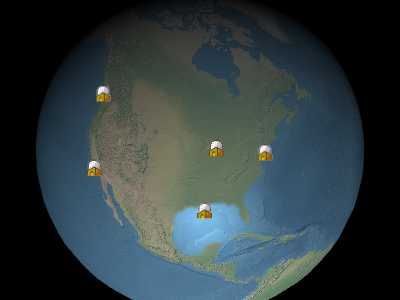 Example billboards |
| BillboardVisualizer | A Visualizer which maps Entity#billboard to a Billboard. |
| BoxGeometryUpdater | A GeometryUpdater for boxes. Clients do not normally create this class directly, but instead rely on DataSourceDisplay. |
| BoxGraphics | Describes a box. The center position and orientation are determined by the containing Entity. |
| CallbackPositionProperty | A PositionProperty whose value is lazily evaluated by a callback function. |
| CallbackProperty | A Property whose value is lazily evaluated by a callback function. |
| Cesium3DTilesetGraphics | A 3D Tiles tileset represented by an Entity. The tileset modelMatrix is determined by the containing Entity position and orientation or is left unset if position is undefined. |
| Cesium3DTilesetVisualizer | A Visualizer which maps Entity#tileset to a Cesium3DTileset. |
| CheckerboardMaterialProperty | A MaterialProperty that maps to checkerboard Material uniforms. |
| ColorMaterialProperty | A MaterialProperty that maps to solid color Material uniforms. |
| CompositeEntityCollection | Non-destructively composites multiple EntityCollection instances into a single collection. If a Entity with the same ID exists in multiple collections, it is non-destructively merged into a single new entity instance. If an entity has the same property in multiple collections, the property of the Entity in the last collection of the list it belongs to is used. CompositeEntityCollection can be used almost anywhere that a EntityCollection is used. |
| CompositeMaterialProperty | A CompositeProperty which is also a MaterialProperty. |
| CompositePositionProperty | A CompositeProperty which is also a PositionProperty. |
| CompositeProperty | A Property which is defined by a TimeIntervalCollection, where the data property of each TimeInterval is another Property instance which is evaluated at the provided time. |
| ConstantPositionProperty | A PositionProperty whose value does not change in respect to the ReferenceFrame in which is it defined. |
| ConstantProperty | A Property whose value does not change with respect to simulation time. |
| CorridorGeometryUpdater | A GeometryUpdater for corridors. Clients do not normally create this class directly, but instead rely on DataSourceDisplay. |
| CorridorGraphics | Describes a corridor, which is a shape defined by a centerline and width that conforms to the curvature of the globe. It can be placed on the surface or at altitude and can optionally be extruded into a volume. |
| CustomDataSource | A DataSource implementation which can be used to manually manage a group of entities. |
| CylinderGeometryUpdater | A GeometryUpdater for cylinders. Clients do not normally create this class directly, but instead rely on DataSourceDisplay. |
| CylinderGraphics | Describes a cylinder, truncated cone, or cone defined by a length, top radius, and bottom radius. The center position and orientation are determined by the containing Entity. |
| CzmlDataSource | A DataSource which processes CZML. |
| DataSource | Defines the interface for data sources, which turn arbitrary data into a EntityCollection for generic consumption. This object is an interface for documentation purposes and is not intended to be instantiated directly. |
| DataSourceClock | Represents desired clock settings for a particular DataSource. These settings may be applied to the Clock when the DataSource is loaded. |
| DataSourceCollection | A collection of DataSource instances. |
| DataSourceDisplay | Visualizes a collection of DataSource instances. |
| EllipseGeometryUpdater | A GeometryUpdater for ellipses. Clients do not normally create this class directly, but instead rely on DataSourceDisplay. |
| EllipseGraphics | Describes an ellipse defined by a center point and semi-major and semi-minor axes. The ellipse conforms to the curvature of the globe and can be placed on the surface or at altitude and can optionally be extruded into a volume. The center point is determined by the containing Entity. |
| EllipsoidGeometryUpdater | A GeometryUpdater for ellipsoids. Clients do not normally create this class directly, but instead rely on DataSourceDisplay. |
| EllipsoidGraphics | Describe an ellipsoid or sphere. The center position and orientation are determined by the containing Entity. |
| Entity | Entity instances aggregate multiple forms of visualization into a single high-level object. They can be created manually and added to Viewer#entities or be produced by data sources, such as CzmlDataSource and GeoJsonDataSource. |
| EntityCluster | Defines how screen space objects (billboards, points, labels) are clustered. |
| EntityCollection | An observable collection of Entity instances where each entity has a unique id. |
| EntityView | A utility object for tracking an entity with the camera. |
| GeoJsonDataSource | A DataSource which processes both GeoJSON and TopoJSON data. simplestyle-spec properties will also be used if they are present. |
| GeometryUpdater | An abstract class for updating geometry entities. |
| GeometryVisualizer | A general purpose visualizer for geometry represented by Primitive instances. |
| GpxDataSource | A DataSource which processes the GPS Exchange Format (GPX). |
| GridMaterialProperty | A MaterialProperty that maps to grid Material uniforms. |
| GroundGeometryUpdater | An abstract class for updating ground geometry entities. |
| ImageMaterialProperty | A MaterialProperty that maps to image Material uniforms. |
| KmlCamera | Representation of <Camera> from KML |
| KmlDataSource | A DataSource which processes Keyhole Markup Language 2.2 (KML). KML support in Cesium is incomplete, but a large amount of the standard, as well as Google's Non visual feature data, such as |
| KmlFeatureData | Contains KML Feature data loaded into the Entity.kml property by KmlDataSource. |
| KmlLookAt | - |
| KmlTour | Describes a KmlTour, which uses KmlTourFlyTo, and KmlTourWait to guide the camera to a specified destinations on given time intervals. |
| KmlTourFlyTo | Transitions the KmlTour to the next destination. This transition is facilitated using a specified flyToMode over a given number of seconds. |
| KmlTourWait | Pauses the KmlTour for a given number of seconds. |
| LabelGraphics | Describes a two dimensional label located at the position of the containing Entity. 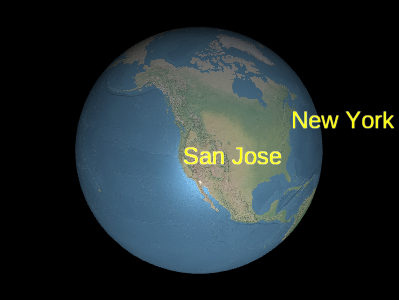 Example labels |
| LabelVisualizer | A Visualizer which maps the LabelGraphics instance in Entity#label to a Label. |
| MaterialProperty | The interface for all Property objects that represent Material uniforms. This type defines an interface and cannot be instantiated directly. |
| ModelGraphics | A 3D model based on glTF, the runtime asset format for WebGL, OpenGL ES, and OpenGL. The position and orientation of the model is determined by the containing Entity. Cesium includes support for glTF geometry, materials, animations, and skinning. Cameras and lights are not currently supported. |
| ModelVisualizer | A Visualizer which maps Entity#model to a Model. |
| NodeTransformationProperty | A Property that produces TranslationRotationScale data. |
| PathGraphics | Describes a polyline defined as the path made by an Entity as it moves over time. |
| PathVisualizer | A Visualizer which maps Entity#path to a Polyline. |
| PlaneGeometryUpdater | A GeometryUpdater for planes. Clients do not normally create this class directly, but instead rely on DataSourceDisplay. |
| PlaneGraphics | Describes a plane. The center position and orientation are determined by the containing Entity. |
| PointGraphics | Describes a graphical point located at the position of the containing Entity. |
| PointVisualizer | A Visualizer which maps Entity#point to a PointPrimitive. |
| PolygonGeometryUpdater | A GeometryUpdater for polygons. Clients do not normally create this class directly, but instead rely on DataSourceDisplay. |
| PolygonGraphics | Describes a polygon defined by an hierarchy of linear rings which make up the outer shape and any nested holes. The polygon conforms to the curvature of the globe and can be placed on the surface or at altitude and can optionally be extruded into a volume. |
| PolylineArrowMaterialProperty | A MaterialProperty that maps to PolylineArrow Material uniforms. |
| PolylineDashMaterialProperty | A MaterialProperty that maps to polyline dash Material uniforms. |
| PolylineGeometryUpdater | A GeometryUpdater for polylines. Clients do not normally create this class directly, but instead rely on DataSourceDisplay. |
| PolylineGlowMaterialProperty | A MaterialProperty that maps to polyline glow Material uniforms. |
| PolylineGraphics | Describes a polyline. The first two positions define a line segment, and each additional position defines a line segment from the previous position. The segments can be linear connected points, great arcs, or clamped to terrain. |
| PolylineOutlineMaterialProperty | A MaterialProperty that maps to polyline outline Material uniforms. |
| PolylineVisualizer | A visualizer for polylines represented by Primitive instances. |
| PolylineVolumeGeometryUpdater | A GeometryUpdater for polyline volumes. Clients do not normally create this class directly, but instead rely on DataSourceDisplay. |
| PolylineVolumeGraphics | Describes a polyline volume defined as a line strip and corresponding two dimensional shape which is extruded along it. The resulting volume conforms to the curvature of the globe. |
| PositionProperty | The interface for all Property objects that define a world location as a Cartesian3 with an associated ReferenceFrame. This type defines an interface and cannot be instantiated directly. |
| PositionPropertyArray | A Property whose value is an array whose items are the computed value of other PositionProperty instances. |
| Property | The interface for all properties, which represent a value that can optionally vary over time. This type defines an interface and cannot be instantiated directly. |
| PropertyArray | A Property whose value is an array whose items are the computed value of other property instances. |
| PropertyBag | A Property whose value is a key-value mapping of property names to the computed value of other properties. |
| RectangleGeometryUpdater | A GeometryUpdater for rectangles. Clients do not normally create this class directly, but instead rely on DataSourceDisplay. |
| RectangleGraphics | Describes graphics for a Rectangle. The rectangle conforms to the curvature of the globe and can be placed on the surface or at altitude and can optionally be extruded into a volume. |
| ReferenceProperty | A Property which transparently links to another property on a provided object. |
| SampledPositionProperty | A SampledProperty which is also a PositionProperty. |
| SampledProperty | A Property whose value is interpolated for a given time from the provided set of samples and specified interpolation algorithm and degree. |
| StripeMaterialProperty | A MaterialProperty that maps to stripe Material uniforms. |
| TimeIntervalCollectionPositionProperty | A TimeIntervalCollectionProperty which is also a PositionProperty. |
| TimeIntervalCollectionProperty | A Property which is defined by a TimeIntervalCollection, where the data property of each TimeInterval represents the value at time. |
| VelocityOrientationProperty | A Property which evaluates to a Quaternion rotation based on the velocity of the provided PositionProperty. |
| VelocityVectorProperty | A Property which evaluates to a Cartesian3 vector based on the velocity of the provided PositionProperty. |
| Visualizer | Defines the interface for visualizers. Visualizers are plug-ins to DataSourceDisplay that render data associated with DataSource instances. This object is an interface for documentation purposes and is not intended to be instantiated directly. |
| WallGeometryUpdater | A GeometryUpdater for walls. Clients do not normally create this class directly, but instead rely on DataSourceDisplay. |
| WallGraphics | Describes a two dimensional wall defined as a line strip and optional maximum and minimum heights. The wall conforms to the curvature of the globe and can be placed along the surface or at altitude. |
| Appearance | An appearance defines the full GLSL vertex and fragment shaders and the render state used to draw a Primitive. All appearances implement this base Appearance interface. |
| ArcGisMapServerImageryProvider | This object is normally not instantiated directly, use ArcGisMapServerImageryProvider.fromBasemapType or ArcGisMapServerImageryProvider.fromUrl. |
| Atmosphere | Common atmosphere settings used by 3D Tiles and models for rendering sky atmosphere, ground atmosphere, and fog. |
| Azure2DImageryProvider | Provides 2D image tiles from Azure. |
| Billboard | A billboard is created and its initial properties are set by calling BillboardCollection#add. Do not call the constructor directly. A viewport-aligned image positioned in the 3D scene, that is created and rendered using a BillboardCollection. Example billboards |
| BillboardCollection | A renderable collection of billboards. Billboards are viewport-aligned images positioned in the 3D scene. Example billboards Billboards are added and removed from the collection using BillboardCollection#add and BillboardCollection#remove. Billboards in a collection automatically share textures for images with the same identifier. |
| BingMapsImageryProvider | To construct a BingMapsImageryProvider, call BingMapsImageryProvider.fromUrl. Do not call the constructor directly. |
| BoxEmitter | A ParticleEmitter that emits particles within a box. Particles will be positioned randomly within the box and have initial velocities emanating from the center of the box. |
| Camera | The camera is defined by a position, orientation, and view frustum. The orientation forms an orthonormal basis with a view, up and right = view x up unit vectors. The viewing frustum is defined by 6 planes. Each plane is represented by a Cartesian4 object, where the x, y, and z components define the unit vector normal to the plane, and the w component is the distance of the plane from the origin/camera position. |
| CameraEventAggregator | Aggregates input events. For example, suppose the following inputs are received between frames: left mouse button down, mouse move, mouse move, left mouse button up. These events will be aggregated into one event with a start and end position of the mouse. |
| Cesium3DTile | A tile in a Cesium3DTileset. When a tile is first created, its content is not loaded; the content is loaded on-demand when needed based on the view. Do not construct this directly, instead access tiles through Cesium3DTileset#tileVisible. |
| Cesium3DTileContent | The content of a tile in a Cesium3DTileset. Derived classes of this interface provide access to individual features in the tile. Access derived objects through Cesium3DTile#content. This type describes an interface and is not intended to be instantiated directly. |
| Cesium3DTileFeature | A feature of a Cesium3DTileset. Provides access to a feature's properties stored in the tile's batch table, as well as the ability to show/hide a feature and change its highlight color via Cesium3DTileFeature#show and Cesium3DTileFeature#color, respectively. Modifications to a Do not construct this directly. Access it through Cesium3DTileContent#getFeature or picking using Scene#pick. |
| Cesium3DTilePointFeature | A point feature of a Cesium3DTileset. Provides access to a feature's properties stored in the tile's batch table, as well as the ability to show/hide a feature and change its point properties Modifications to a Do not construct this directly. Access it through Cesium3DTileContent#getFeature or picking using Scene#pick and Scene#pickPosition. |
| Cesium3DTileStyle | A style that is applied to a Cesium3DTileset. Evaluates an expression defined using the 3D Tiles Styling language. |
| Cesium3DTilesVoxelProvider | A VoxelProvider that fetches voxel data from a 3D Tiles tileset. Implements the VoxelProvider interface. This object is normally not instantiated directly, use Cesium3DTilesVoxelProvider.fromUrl. |
| Cesium3DTileset | A 3D Tiles tileset, used for streaming massive heterogeneous 3D geospatial datasets. |
| CircleEmitter | A ParticleEmitter that emits particles from a circle. Particles will be positioned within a circle and have initial velocities going along the z vector. |
| ClassificationPrimitive | A classification primitive represents a volume enclosing geometry in the Scene to be highlighted. A primitive combines geometry instances with an Appearance that describes the full shading, including Material and RenderState. Roughly, the geometry instance defines the structure and placement, and the appearance defines the visual characteristics. Decoupling geometry and appearance allows us to mix and match most of them and add a new geometry or appearance independently of each other. Only PerInstanceColorAppearance with the same color across all instances is supported at this time when using ClassificationPrimitive directly. For full Appearance support when classifying terrain or 3D Tiles use GroundPrimitive instead. For correct rendering, this feature requires the EXT_frag_depth WebGL extension. For hardware that do not support this extension, there will be rendering artifacts for some viewing angles. Valid geometries are BoxGeometry, CylinderGeometry, EllipsoidGeometry, PolylineVolumeGeometry, and SphereGeometry. Geometries that follow the surface of the ellipsoid, such as CircleGeometry, CorridorGeometry, EllipseGeometry, PolygonGeometry, and RectangleGeometry, are also valid if they are extruded volumes; otherwise, they will not be rendered. |
| ClippingPlane | A Plane in Hessian Normal form to be used with ClippingPlaneCollection. Compatible with mathematics functions in Plane |
| ClippingPlaneCollection | Specifies a set of clipping planes. Clipping planes selectively disable rendering in a region on the outside of the specified list of ClippingPlane objects for a single gltf model, 3D Tileset, or the globe. In general the clipping planes' coordinates are relative to the object they're attached to, so a plane with distance set to 0 will clip through the center of the object. For 3D Tiles, the root tile's transform is used to position the clipping planes. If a transform is not defined, the root tile's Cesium3DTile#boundingSphere is used instead. |
| ClippingPolygon | A geodesic polygon to be used with ClippingPlaneCollection for selectively hiding regions in a model, a 3D tileset, or the globe. |
| ClippingPolygonCollection | Specifies a set of clipping polygons. Clipping polygons selectively disable rendering in a region inside or outside the specified list of ClippingPolygon objects for a single glTF model, 3D Tileset, or the globe. |
| CloudCollection | A renderable collection of clouds in the 3D scene. 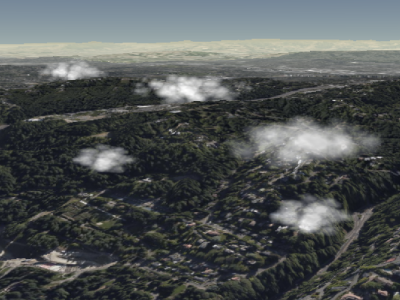 Example cumulus clouds Clouds are added and removed from the collection using CloudCollection#add and CloudCollection#remove. |
| ConditionsExpression | An expression for a style applied to a Cesium3DTileset. Evaluates a conditions expression defined using the 3D Tiles Styling language. Implements the StyleExpression interface. |
| ConeEmitter | A ParticleEmitter that emits particles within a cone. Particles will be positioned at the tip of the cone and have initial velocities going towards the base. |
| CreditDisplay | The credit display is responsible for displaying credits on screen. |
| CubeMapPanorama | A Panorama that displays imagery in cube map format in a scene. This is only supported in 3D. The cube map panorama is faded out when morphing to 2D or Columbus view. The size of the cube map panorama must not exceed Scene#maximumSkyBoxSize. |
| CumulusCloud | A cloud is created and its initial properties are set by calling CloudCollection#add. and CloudCollection#remove. Do not call the constructor directly. A cumulus cloud billboard positioned in the 3D scene, that is created and rendered using a CloudCollection. Example cumulus clouds |
| DebugAppearance | Visualizes a vertex attribute by displaying it as a color for debugging. Components for well-known unit-length vectors, i.e., |
| DebugCameraPrimitive | Draws the outline of the camera's view frustum. |
| DebugModelMatrixPrimitive | Draws the axes of a reference frame defined by a matrix that transforms to world coordinates, i.e., Earth's WGS84 coordinates. The most prominent example is a primitives modelMatrix. The X axis is red; Y is green; and Z is blue. This is for debugging only; it is not optimized for production use. |
| DirectionalLight | A light that gets emitted in a single direction from infinitely far away. |
| DiscardEmptyTileImagePolicy | A policy for discarding tile images that contain no data (and so aren't actually images). This policy discards DiscardEmptyTileImagePolicy.EMPTY_IMAGE, which is expected to be used in place of any empty tile images by the image loading code. |
| DiscardMissingTileImagePolicy | A policy for discarding tile images that match a known image containing a "missing" image. |
| DynamicEnvironmentMapManager | Generates an environment map at the given position based on scene's current lighting conditions. From this, it produces multiple levels of specular maps and spherical harmonic coefficients than can be used with ImageBasedLighting for models or tilesets. |
| EllipsoidSurfaceAppearance | An appearance for geometry on the surface of the ellipsoid like PolygonGeometry and RectangleGeometry, which supports all materials like MaterialAppearance with MaterialAppearance.MaterialSupport.ALL. However, this appearance requires fewer vertex attributes since the fragment shader can procedurally compute normal, tangent, and bitangent. |
| EquirectangularPanorama | A Panorama that displays imagery in equirectangular format in a scene. |
| Expression | An expression for a style applied to a Cesium3DTileset. Evaluates an expression defined using the 3D Tiles Styling language. Implements the StyleExpression interface. |
| Fog | Blends the atmosphere to geometry far from the camera for horizon views. Allows for additional performance improvements by rendering less geometry and dispatching less terrain requests. |
| FrameRateMonitor | Monitors the frame rate (frames per second) in a Scene and raises an event if the frame rate is lower than a threshold. Later, if the frame rate returns to the required level, a separate event is raised. To avoid creating multiple FrameRateMonitors for a single Scene, use FrameRateMonitor.fromScene instead of constructing an instance explicitly. |
| GaussianSplat3DTileContent | Represents the contents of a glTF or glb using the KHR_gaussian_splatting and KHR_gaussian_splatting_compression_spz_2 extensions. Implements the Cesium3DTileContent interface. |
| GetFeatureInfoFormat | Describes the format in which to request GetFeatureInfo from a Web Map Service (WMS) server. |
| Globe | The globe rendered in the scene, including its terrain (Globe#terrainProvider) and imagery layers (Globe#imageryLayers). Access the globe using Scene#globe. |
| GlobeTranslucency | Properties for controlling globe translucency. |
| Google2DImageryProvider | This object is normally not instantiated directly, use Google2DImageryProvider.fromIonAssetId or Google2DImageryProvider.fromUrl. |
| GoogleEarthEnterpriseImageryProvider | To construct a GoogleEarthEnterpriseImageryProvider, call GoogleEarthEnterpriseImageryProvider.fromMetadata. Do not call the constructor directly. |
| GoogleEarthEnterpriseMapsProvider | To construct a GoogleEarthEnterpriseMapsProvider, call GoogleEarthEnterpriseImageryProvider.fromUrl. Do not call the constructor directly. |
| GoogleStreetViewCubeMapPanoramaProvider | This object is normally not instantiated directly, use GoogleStreetViewCubeMapPanoramaProvider.fromUrl. |
| GridImageryProvider | An ImageryProvider that draws a wireframe grid on every tile with controllable background and glow. May be useful for custom rendering effects or debugging terrain. |
| GroundPolylinePrimitive | A GroundPolylinePrimitive represents a polyline draped over the terrain or 3D Tiles in the Scene. Only to be used with GeometryInstances containing GroundPolylineGeometry. |
| GroundPrimitive | A ground primitive represents geometry draped over terrain or 3D Tiles in the Scene. A primitive combines geometry instances with an Appearance that describes the full shading, including Material and RenderState. Roughly, the geometry instance defines the structure and placement, and the appearance defines the visual characteristics. Decoupling geometry and appearance allows us to mix and match most of them and add a new geometry or appearance independently of each other. Support for the WEBGL_depth_texture extension is required to use GeometryInstances with different PerInstanceColors or materials besides PerInstanceColorAppearance. Textured GroundPrimitives were designed for notional patterns and are not meant for precisely mapping textures to terrain - for that use case, use SingleTileImageryProvider. For correct rendering, this feature requires the EXT_frag_depth WebGL extension. For hardware that do not support this extension, there will be rendering artifacts for some viewing angles. Valid geometries are CircleGeometry, CorridorGeometry, EllipseGeometry, PolygonGeometry, and RectangleGeometry. |
| I3SDataProvider | An I3SDataProvider is the main public class for I3S support. The url option should return a scene object. Currently supported I3S versions are 1.6 and 1.7/1.8 (OGC I3S 1.2). I3SFeature and I3SNode classes implement the Object Model for I3S entities, with public interfaces. |
| I3SFeature | This class implements an I3S Feature. Do not construct this directly, instead access tiles through I3SNode. |
| I3SField | This class implements an I3S Field which is custom data attached to nodes |
| I3SGeometry | This class implements an I3S Geometry. Each I3SGeometry generates an in memory glTF to be used as content for a Cesium3DTile Do not construct this directly, instead access tiles through I3SNode. |
| I3SLayer | This class implements an I3S layer. In CesiumJS each I3SLayer creates a Cesium3DTileset. Do not construct this directly, instead access layers through I3SDataProvider. |
| I3SNode | This class implements an I3S Node. In CesiumJS each I3SNode creates a Cesium3DTile. Do not construct this directly, instead access tiles through I3SLayer. |
| I3SStatistics | This class implements an I3S statistics for Building Scene Layer. Do not construct this directly, instead access statistics through I3SDataProvider. |
| I3SSublayer | This class implements an I3S sublayer for Building Scene Layer. This object is normally not instantiated directly, use I3SSublayer.fromData. |
| I3SSymbology | This class implements an I3S symbology for I3S Layers. Do not construct this directly, instead access symbology through I3SLayer. |
| ImageBasedLighting | Properties for managing image-based lighting on tilesets and models. Also manages the necessary resources and textures. If specular environment maps are used, ImageBasedLighting#destroy must be called when the image-based lighting is no longer needed to clean up GPU resources properly. If a model or tileset creates an instance of ImageBasedLighting, it will handle this. Otherwise, the application is responsible for calling destroy(). |
| ImageryLayer | An imagery layer that displays tiled image data from a single imagery provider on a Globe or Cesium3DTileset. |
| ImageryLayerCollection | An ordered collection of imagery layers for rendering raster imagery on a Globe or Cesium3DTileset. |
| ImageryLayerFeatureInfo | Describes a rasterized feature, such as a point, polygon, polyline, etc., in an imagery layer. |
| ImageryProvider | Provides imagery to be displayed on the surface of an ellipsoid. This type describes an interface and is not intended to be instantiated directly. |
| IonImageryProvider | To construct a IonImageryProvider, call IonImageryProvider.fromAssetId. Do not call the constructor directly. |
| Label | Create labels by calling LabelCollection#add. Do not call the constructor directly. |
| LabelCollection | A renderable collection of labels. Labels are viewport-aligned text positioned in the 3D scene. Each label can have a different font, color, scale, etc. Example labels Labels are added and removed from the collection using LabelCollection#add and LabelCollection#remove. |
| Light | A light source. This type describes an interface and is not intended to be instantiated directly. Together, color and intensity produce a high-dynamic-range light color. intensity can also be used individually to dim or brighten the light without changing the hue. |
| MapboxImageryProvider | Provides tiled imagery hosted by Mapbox. |
| MapboxStyleImageryProvider | Provides tiled imagery hosted by Mapbox. |
| Material | A Material defines surface appearance through a combination of diffuse, specular, normal, emission, and alpha components. These values are specified using a JSON schema called Fabric which gets parsed and assembled into glsl shader code behind-the-scenes. Check out the wiki page for more details on Fabric. |
| MaterialAppearance | An appearance for arbitrary geometry (as opposed to EllipsoidSurfaceAppearance, for example) that supports shading with materials. |
| MetadataClass | A metadata class. |
| MetadataClassProperty | A metadata property, as part of a MetadataClass. See the 3D Metadata Specification for 3D Tiles |
| MetadataEnum | A metadata enum. See the 3D Metadata Specification for 3D Tiles |
| MetadataEnumValue | A metadata enum value. See the 3D Metadata Specification for 3D Tiles |
| MetadataSchema | A schema containing classes and enums. See the 3D Metadata Specification for 3D Tiles |
| CustomShader | A user defined GLSL shader used with Model as well as Cesium3DTileset. If texture uniforms are used, additional resource management must be done:
See the Custom Shader Guide for more detailed documentation. |
| AnchorPointDirect | Metadata for one stored anchor point using direct storage. |
| AnchorPointIndirect | Metadata for one stored anchor point. |
| CorrelationGroup | Metadata identifying parameters using same correlation modeling and associated correlation parameters. |
| GltfGpmLocal | The GPM metadata for a Ground-Space Indirect implementation stored locally (i.e. a tile and/or leaf node). |
| Spdcf | Variables for a Strictly Positive-Definite Correlation Function. |
| Model | To construct a Model, call Model.fromGltfAsync. Do not call the constructor directly. A 3D model based on glTF, the runtime asset format for WebGL, OpenGL ES, and OpenGL. Cesium supports glTF assets with the following extensions:
Note: for models with compressed textures using the KHR_texture_basisu extension, we recommend power of 2 textures in both dimensions for maximum compatibility. This is because some samplers require power of 2 textures (Using textures in WebGL) and KHR_texture_basisu requires multiple of 4 dimensions (KHR_texture_basisu additional requirements). |
| ModelAnimation | Create animations by calling ModelAnimationCollection#add. Do not call the constructor directly. |
| ModelAnimationCollection | Access a model's animations Model#activeAnimations. Do not call the constructor directly |
| ModelFeature | A feature of a Model. Provides access to a feature's properties stored in the model's feature table. Modifications to a Do not construct this directly. Access it through picking using Scene#pick. |
| ModelNode | Use Model#getNode to get a node from a loaded model. Do not call the constructor directly. |
| TextureUniform | A simple struct that serves as a value of a sampler2D-valued uniform. This is used with CustomShader and TextureManager |
| Moon | Draws the Moon in 3D. |
| NeverTileDiscardPolicy | A TileDiscardPolicy specifying that tile images should never be discard. |
| OpenStreetMapImageryProvider | An imagery provider that provides tiled imagery hosted by OpenStreetMap or another provider of Slippy tiles. The default url connects to OpenStreetMap's volunteer-run servers, so you must conform to their Tile Usage Policy. |
| Panorama | Displays panorama imagery in a scene. This type describes an interface and is not intended to be instantiated directly. |
| PanoramaProvider | Provides imagery to be displayed on the surface of an ellipsoid. This type describes an interface and is not intended to be instantiated directly. |
| Particle | A particle emitted by a ParticleSystem. |
| ParticleBurst | Represents a burst of Particles from a ParticleSystem at a given time in the systems lifetime. |
| ParticleEmitter | An object that initializes a Particle from a ParticleSystem. This type describes an interface and is not intended to be instantiated directly. |
| ParticleSystem | A ParticleSystem manages the updating and display of a collection of particles. |
| PerInstanceColorAppearance | An appearance for GeometryInstance instances with color attributes. This allows several geometry instances, each with a different color, to be drawn with the same Primitive as shown in the second example below. |
| PointCloudShading | Options for performing point attenuation based on geometric error when rendering point clouds using 3D Tiles. |
| PointPrimitive | A point is created and its initial properties are set by calling PointPrimitiveCollection#add. Do not call the constructor directly. A graphical point positioned in the 3D scene, that is created and rendered using a PointPrimitiveCollection. |
| PointPrimitiveCollection | A renderable collection of points. Points are added and removed from the collection using PointPrimitiveCollection#add and PointPrimitiveCollection#remove. |
| Polyline | Create this by calling PolylineCollection#add. Do not call the constructor directly. |
| PolylineCollection | A renderable collection of polylines.  Example polylines Polylines are added and removed from the collection using PolylineCollection#add and PolylineCollection#remove. |
| PolylineColorAppearance | An appearance for GeometryInstance instances with color attributes and PolylineGeometry or GroundPolylineGeometry. This allows several geometry instances, each with a different color, to be drawn with the same Primitive. |
| PolylineMaterialAppearance | An appearance for PolylineGeometry that supports shading with materials. |
| PostProcessStage | Runs a post-process stage on either the texture rendered by the scene or the output of a previous post-process stage. |
| PostProcessStageCollection | A collection of PostProcessStages and/or PostProcessStageComposites. The input texture for each post-process stage is the texture rendered to by the scene or the texture rendered to by the previous stage in the collection. If the ambient occlusion or bloom stages are enabled, they will execute before all other stages. If the FXAA stage is enabled, it will execute after all other stages. |
| PostProcessStageComposite | A collection of PostProcessStages or other post-process composite stages that execute together logically. All stages are executed in the order of the array. The input texture changes based on the value of |
| Primitive | A primitive represents geometry in the Scene. The geometry can be from a single GeometryInstance as shown in example 1 below, or from an array of instances, even if the geometry is from different geometry types, e.g., an RectangleGeometry and an EllipsoidGeometry as shown in Code Example 2. A primitive combines geometry instances with an Appearance that describes the full shading, including Material and RenderState. Roughly, the geometry instance defines the structure and placement, and the appearance defines the visual characteristics. Decoupling geometry and appearance allows us to mix and match most of them and add a new geometry or appearance independently of each other. Combining multiple instances into one primitive is called batching, and significantly improves performance for static data. Instances can be individually picked; Scene#pick returns their GeometryInstance#id. Using per-instance appearances like PerInstanceColorAppearance, each instance can also have a unique color. Geometry can either be created and batched on a web worker or the main thread. The first two examples show geometry that will be created on a web worker by using the descriptions of the geometry. The third example shows how to create the geometry on the main thread by explicitly calling the |
| PrimitiveCollection | A collection of primitives. This is most often used with Scene#primitives, but PrimitiveCollection is also a primitive itself so collections can be added to collections forming a hierarchy. |
| LRUCache | A simple Least Recently Used (LRU) cache implementation. |
| Scene | The container for all 3D graphical objects and state in a Cesium virtual scene. Generally, a scene is not created directly; instead, it is implicitly created by CesiumWidget. |
| ScreenSpaceCameraController | Modifies the camera position and orientation based on mouse input to a canvas. |
| ShadowMap | Use Viewer#shadowMap to get the scene's shadow map. Do not construct this directly. |
| SingleTileImageryProvider | Provides a single, top-level imagery tile. The single image is assumed to be in the Geographic projection (i.e. WGS84 / EPSG:4326), and will be rendered using a GeographicTilingScheme. |
| SkyAtmosphere | An atmosphere drawn around the limb of the provided ellipsoid. Based on Display of The Earth Taking Into Account Atmospheric Scattering. This is only supported in 3D. Atmosphere is faded out when morphing to 2D or Columbus view. |
| SkyBox | A sky box around the scene to draw stars. The sky box is defined using the True Equator Mean Equinox (TEME) axes. This is only supported in 3D. The sky box is faded out when morphing to 2D or Columbus view. The size of the sky box must not exceed Scene#maximumCubeMapSize. |
| SphereEmitter | A ParticleEmitter that emits particles within a sphere. Particles will be positioned randomly within the sphere and have initial velocities emanating from the center of the sphere. |
| StyleExpression | An expression for a style applied to a Cesium3DTileset. Derived classes of this interface evaluate expressions in the 3D Tiles Styling language. This type describes an interface and is not intended to be instantiated directly. |
| Sun | Draws a sun billboard. This is only supported in 3D and Columbus view. |
| SunLight | A directional light source that originates from the Sun. |
| Terrain | A helper to manage async operations of a terrain provider. |
| TileCoordinatesImageryProvider | An ImageryProvider that draws a box around every rendered tile in the tiling scheme, and draws a label inside it indicating the X, Y, Level coordinates of the tile. This is mostly useful for debugging terrain and imagery rendering problems. |
| TileDiscardPolicy | A policy for discarding tile images according to some criteria. This type describes an interface and is not intended to be instantiated directly. |
| TileMapServiceImageryProvider | To construct a TileMapServiceImageryProvider, call TileMapServiceImageryProvider.fromUrl. Do not call the constructor directly. |
| TimeDynamicImagery | Provides functionality for ImageryProviders that have time dynamic imagery |
| TimeDynamicPointCloud | Provides playback of time-dynamic point cloud data. Point cloud frames are prefetched in intervals determined by the average frame load time and the current clock speed. If intermediate frames cannot be loaded in time to meet playback speed, they will be skipped. If frames are sufficiently small or the clock is sufficiently slow then no frames will be skipped. |
| UrlTemplateImageryProvider | Provides imagery by requesting tiles using a specified URL template. |
| ViewportQuad | A viewport aligned quad. |
| VoxelCell | A cell from a VoxelPrimitive. Provides access to properties associated with one cell of a voxel primitive. Do not construct this directly. Access it through picking using Scene#pickVoxel. |
| VoxelContent | To construct a VoxelContent, call VoxelContent.fromMetadataArray or VoxelContent.fromGltf. Do not call the constructor directly. An object representing voxel content for a Cesium3DTilesVoxelProvider. |
| VoxelPrimitive | A primitive that renders voxel data from a VoxelProvider. |
| VoxelProvider | Provides voxel data. Intended to be used with VoxelPrimitive. This type describes an interface and is not intended to be instantiated directly. |
| WebMapServiceImageryProvider | Provides tiled imagery hosted by a Web Map Service (WMS) server. |
| WebMapTileServiceImageryProvider | Provides tiled imagery served by WMTS 1.0.0 compliant servers. This provider supports HTTP KVP-encoded and RESTful GetTile requests, but does not yet support the SOAP encoding. |
| CesiumWidget | A widget containing a Cesium scene. |
| Animation |  Animation widget The Animation widget provides buttons for play, pause, and reverse, along with the current time and date, surrounded by a "shuttle ring" for controlling the speed of animation. The "shuttle ring" concept is borrowed from video editing, where typically a "jog wheel" can be rotated to move past individual animation frames very slowly, and a surrounding shuttle ring can be twisted to control direction and speed of fast playback. Cesium typically treats time as continuous (not broken into pre-defined animation frames), so this widget offers no jog wheel. Instead, the shuttle ring is capable of both fast and very slow playback. Click and drag the shuttle ring pointer itself (shown above in green), or click in the rest of the ring area to nudge the pointer to the next preset speed in that direction. The Animation widget also provides a "realtime" button (in the upper-left) that keeps animation time in sync with the end user's system clock, typically displaying "today" or "right now." This mode is not available in ClockRange.CLAMPED or ClockRange.LOOP_STOP mode if the current time is outside of Clock's startTime and endTime. |
| AnimationViewModel | The view model for the Animation widget. |
| BaseLayerPicker | 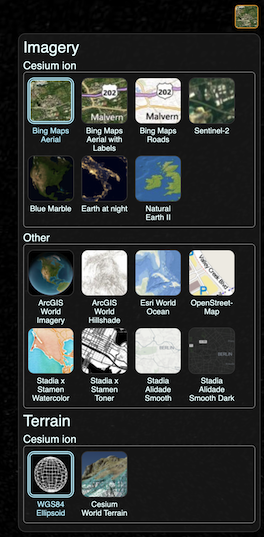 BaseLayerPicker with its drop-panel open. The BaseLayerPicker is a single button widget that displays a panel of available imagery and terrain providers. When imagery is selected, the corresponding imagery layer is created and inserted as the base layer of the imagery collection; removing the existing base. When terrain is selected, it replaces the current terrain provider. Each item in the available providers list contains a name, a representative icon, and a tooltip to display more information when hovered. The list is initially empty, and must be configured before use, as illustrated in the below example. By default, the BaseLayerPicker uses a default list of example providers for demonstration purposes. Notably some of these providers, such as Esri ArcGIS and Stadia Maps, have seperate terms of service and require authentication for production use. |
| BaseLayerPickerViewModel | The view model for BaseLayerPicker. |
| ProviderViewModel | A view model that represents each item in the BaseLayerPicker. |
| Cesium3DTilesInspector | Inspector widget to aid in debugging 3D Tiles |
| Cesium3DTilesInspectorViewModel | The view model for Cesium3DTilesInspector. |
| CesiumInspector | Inspector widget to aid in debugging |
| CesiumInspectorViewModel | The view model for CesiumInspector. |
| ClockViewModel | A view model which exposes a Clock for user interfaces. |
| Command | A Command is a function with an extra canExecute observable property to determine whether the command can be executed. When executed, a Command function will check the value of canExecute and throw if false. |
| FullscreenButton | A single button widget for toggling fullscreen mode. |
| FullscreenButtonViewModel | The view model for FullscreenButton. |
| Geocoder | A widget for finding addresses and landmarks, and flying the camera to them. Geocoding is performed using Cesium ion. |
| GeocoderViewModel | The view model for the Geocoder widget. |
| HomeButton | A single button widget for returning to the default camera view of the current scene. |
| HomeButtonViewModel | The view model for HomeButton. |
| I3SBuildingSceneLayerExplorer | I3S Building Scene Layer widget |
| I3sBslExplorerViewModel | The view model for I3SBuildingSceneLayerExplorer. |
| InfoBox | A widget for displaying information or a description. |
| InfoBoxViewModel | The view model for InfoBox. |
| NavigationHelpButton | The NavigationHelpButton is a single button widget for displaying instructions for navigating the globe with the mouse. |
| NavigationHelpButtonViewModel | The view model for NavigationHelpButton. |
| PerformanceWatchdog | Monitors performance of the application and displays a message if poor performance is detected. |
| PerformanceWatchdogViewModel | The view model for PerformanceWatchdog. |
| ProjectionPicker | The ProjectionPicker is a single button widget for switching between perspective and orthographic projections. |
| ProjectionPickerViewModel | The view model for ProjectionPicker. |
| SceneModePicker |  The SceneModePicker is a single button widget for switching between scene modes; shown to the left in its expanded state. Programatic switching of scene modes will be automatically reflected in the widget as long as the specified Scene is used to perform the change. |
| SceneModePickerViewModel | The view model for SceneModePicker. |
| SelectionIndicator | A widget for displaying an indicator on a selected object. |
| SelectionIndicatorViewModel | The view model for SelectionIndicator. |
| Timeline | The Timeline is a widget for displaying and controlling the current scene time. |
| ToggleButtonViewModel | A view model which exposes the properties of a toggle button. |
| VRButton | A single button widget for toggling vr mode. |
| VRButtonViewModel | The view model for VRButton. |
| Viewer | A base widget for building applications. It composites all of the standard Cesium widgets into one reusable package. The widget can always be extended by using mixins, which add functionality useful for a variety of applications. |
| VoxelInspector | Inspector widget to aid in debugging voxels |
| VoxelInspectorViewModel | The view model for VoxelInspector. |
类型别名
| 类型别名 | 描述 |
|---|---|
| binarySearchComparator | A function used to compare two items while performing a binary search. |
| TypedArray | Union of all numeric typed array types. |
| TypedArrayConstructor | Union of all numeric typed array constructor types. |
| mergeSortComparator | A function used to compare two items while performing a merge sort. |
| exportKmlModelCallback | Since KML does not support glTF models, this callback is required to specify what URL to use for the model in the KML document. It can also be used to add additional files to the externalFiles object, which is the list of files embedded in the exported KMZ, or otherwise returned with the KML string when exporting. |
| ImageryTypes | The format in which ImageryProvider methods return an image may vary by provider, configuration, or server settings. Most common are HTMLImageElement, HTMLCanvasElement, or on supported browsers, ImageBitmap. |
| MetadataValue | An instance of a metadata value. This can be one of the following types:
|
| ComponentsReaderCallback | Reads and returns a value with the given type at the given byte offset from the data view, in little-endian order |
| ComponentReaderCallback | Reads and returns a value with the given type at the given byte offset from the data view, in little-endian order |